
JJ77 Register Process – Create a New Account
Creating a JJ77 account is quick and easy. New users need to register before accessing the platform’s features. After registration, simply log in with your registered details to access your account. Always keep your login information secure to help protect your account.
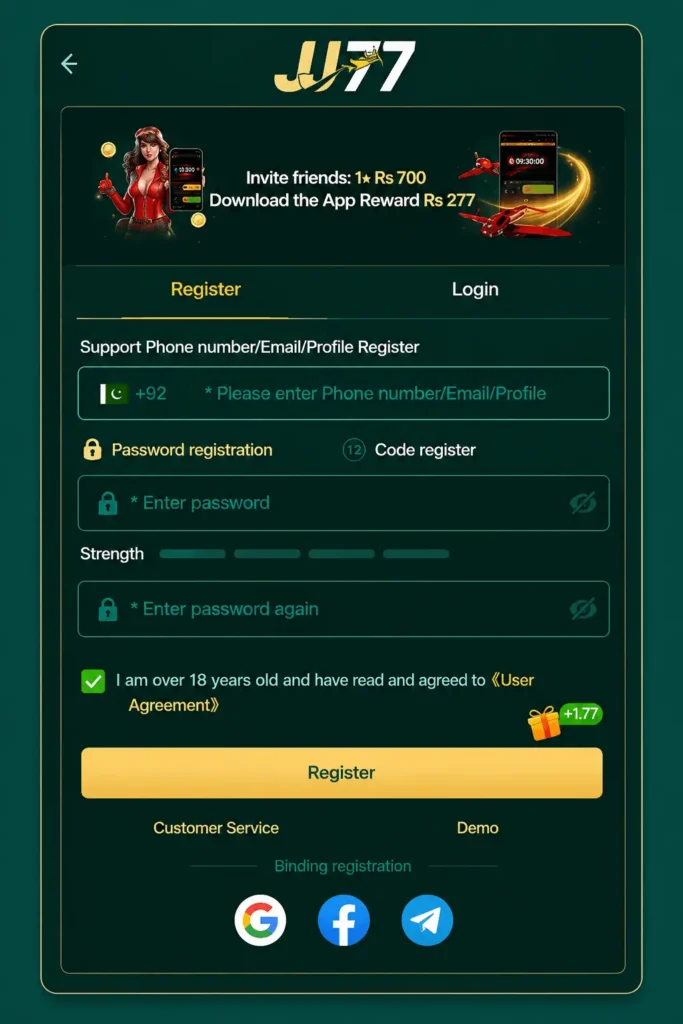
How to Register on a JJ77 Game?
Open the JJ77 Game
Launch the JJ77 Game on your mobile device or visit its official platform using your preferred web browser. Make sure you have a stable internet connection before you begin.
Tap the Register Button
On the home screen, find the Register or Sign Up button and tap it. This will take you to the account creation page.
Enter Your Information
Fill in the required details, such as your mobile number or username. Create a strong password that combines letters, numbers, and special characters for better security.
Complete the Verification
If the platform requests verification, enter the code sent to your registered mobile number or email address. Double-check the code before submitting it.
Accept the Terms
Read the platform’s terms and conditions, then tick the agreement box if you accept them. This step is usually required before your account can be created.
Submit Your Registration
Tap the Register or Create Account button to finish the process. Wait a few moments while your account is created.
Log In to Your New Account
After successful registration, return to the login page. Enter your registered details and sign in to access your account and explore the available features.
Is It Necessary to Create an Account to Play the JJ77 Game?
Yes, creating an account is usually required before playing on JJ77. Registration helps the platform identify users and store account information securely. It also allows players to access features such as game history, promotions, profile settings, and wallet options.
An account also makes it easier to recover access if login details are forgotten. Without registration, many platform features may remain unavailable.
Requirements to Register a JJ77 Account
Before starting registration, prepare the following details:
- A working mobile number or email address
- A secure password
- A stable internet connection
- A compatible smartphone, tablet, or computer
- Correct personal information, if requested
Using accurate details can help prevent login problems in the future.
What to Do After Registration?
Once your account is created, take a few minutes to complete important settings. Change your password regularly and enable available security options. Check your profile information to ensure everything is entered correctly.
New users can also explore platform features, read available instructions, and become familiar with account settings before starting any activity.
How to Solve If There Is an Issue While Registration?
If registration does not work properly, there are several things you can try:
- Check your internet connection.
- Make sure all required fields are completed correctly.
- Confirm that your mobile number or email is entered without errors.
- Try creating the account again after refreshing the page.
- Update the application if you are using an older version.
- Contact customer support if the problem continues.
Most registration issues are solved by checking account details carefully and trying the process again.